Preview and debugging
The live preview
The Rustaveli.Pdf.Preview package shows a document in the browser while you write it. Give the document a console
project of its own — or a --preview switch in an existing one — that calls Preview with the method composing it:
public static class InvoiceDocument
{
    public static Document Compose() => Document.Compose(composition => composition.Section(section =>
    {
        section.Trim = PaperSizes.A5;
        section.Margins = Sides.All(36);
        section.Body().Text("Invoice 2026-041");
    }));
}
Run it under dotnet watch:
The browser opens on the document. Every change saved to the code that composes it is applied by hot reload and the
pages are drawn again, without restarting; a change hot reload cannot apply restarts the program, and the page
reconnects by itself. Content that cannot be set shows the layout failure, explained, in place of the pages.
Preview runs until Ctrl+C. PreviewOptions sets the port, the resolution pages are drawn at, the typefaces, and
whether a browser is opened.
The inspector
Press I, or the Inspect button, to open the inspector beside the pages:
- the frame under the pointer is outlined on the page;
- clicking the page selects the innermost frame there, and the panel lists every frame drawn on that page, each within the frame that drew it, with where it lies and the room it was given;
- each frame made by your code names the file and line that made it, and opens there in Visual Studio Code.
Lines are known where the composing code was built with its symbols, as it is by default.
A preview inside another program
StartPreview starts the same preview without blocking, and hands back the session serving it:
using PreviewSession session = DocumentPreview.StartPreview(InvoiceDocument.Compose, new PreviewOptions { OpenBrowser = false });

Console.WriteLine($"Previewing at {session.Url}");
session.Refresh();
Refresh() composes the document again the next time the browser looks; disposing the session stops it.
Seeing where frames lie
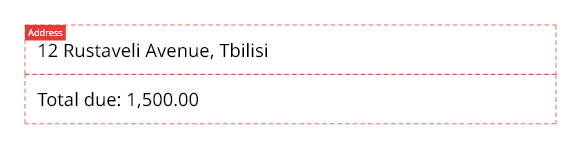
ShowFrameEdges outlines a frame's room in dashed lines, over its content, with a label if given one. Named names
a frame, so the inspector and any layout failure call it by that name:
section.Body().Stack(stack =>
{
    stack.Add().ShowFrameEdges("Address").Inset(8).Text("12 Rustaveli Avenue, Tbilisi");
    stack.Add().Named("Totals").ShowFrameEdges().Inset(8).Text("Total due: 1,500.00");
});
Reading a layout failure
Content that cannot fit even on an empty page — a frame taller than the page, a fixed width wider than it — cannot
be set, and export fails with an OversetException that traces the way down to it:
Document document = Document.Compose(composition => composition.Section(section =>
{
    section.Trim = new Extent(300, 200);
    section.Margins = Sides.All(20);

    section.Body().Stack(stack =>
    {
        stack.Add().Text("Summary");
        stack.Add().Named("Totals").Inset(10).Height(400).Text("Totals");
    });
}));

OversetException failure = Assert.Throws<OversetException>(() => document.ExportPdf());
The body cannot be set even on an empty page, so no further page would help. Space available: 260 × 160 pt. Reason: The content asks for a minimum height of 400.0 pt, but only 140.0 pt is available.
Where it did not fit, from the page down:
  Stack, offered 260 × 160: does not fit
    "Totals", offered 260 × 160: does not fit
      Inset, offered 260 × 160: does not fit
        Constraint, offered 240 × 140: does not fit — The content asks for a minimum height of 400.0 pt, but only 140.0 pt is available.
Each line is a frame, inside the one above it, with the room it was offered. The last is the one that could not
fit, and says why — here the Height(400) constraint, given 140 points after the insets. Frames named with Named appear by name, so name the frames you will want to find.
A document that keeps asking for pages — content that never finishes — stops at Document.PageLimit, 10,000
pages unless set, rather than running on.