using Rustaveli.Pdf;

Document document = Document.Compose(composition => composition.Section(section =>
{
    section.Trim = PaperSizes.A5;
    section.Margins = Sides.All(15.Millimetres());
    section.DefaultType = TypeStyle.Default.WithTypeface("Noto Sans").WithPointSize(12);

    section.Body().Text("Hello from Rustaveli.Pdf.");
}));

document.ExportPdf("hello.pdf");
 hello.pdf · A5 · 1 page
using Rustaveli.Pdf;

(string Item, string Quantity, string Amount)[] lines =
[
    ("Design review", "4", "1,600.00"),
    ("Implementation", "12", "7,200.00"),
    ("Support, one month", "1", "450.00"),
];

Ink blue = Ink.Hex("#1565C0");

Document invoice = Document.Compose(composition => composition.Section(section =>
{
    section.Trim = PaperSizes.A5;
    section.Margins = Sides.All(40);
    section.DefaultType = TypeStyle.Default.WithPointSize(10);

    section.Body().Stack(stack =>
    {
        stack.SpaceBetween(20);

        stack.Add().Text(text =>
        {
            text.Line("Invoice INV-0042").PointSize(22).Bold().Ink(blue);
            text.Line("Issued 29 September 2026, due in 30 days");
        });

        stack.Add().Table(table =>
        {
            table.Columns(columns =>
            {
                columns.Share();
                columns.Fixed(40);
                columns.Fixed(70);
            });

            table.HeaderRows(header =>
            {
                header.Cell().Fill(blue).Inset(6).Text(text => text.Run("Item").Bold().Ink(Ink.White));
                header.Cell().Fill(blue).Inset(6).FlushRight().Text(text => text.Run("Qty").Bold().Ink(Ink.White));
                header.Cell().Fill(blue).Inset(6).FlushRight().Text(text => text.Run("Amount").Bold().Ink(Ink.White));
            });

            foreach ((string item, string quantity, string amount) in lines)
            {
                table.Cell().StrokeBottom(0.5f).Inset(6).Text(item);
                table.Cell().StrokeBottom(0.5f).Inset(6).FlushRight().Text(quantity);
                table.Cell().StrokeBottom(0.5f).Inset(6).FlushRight().Text(amount);
            }
        });

        stack.Add().FlushRight().Text(text => text.Run("Total due 9,250.00").PointSize(14).Bold());
    });
}));

invoice.ExportPdf("invoice.pdf");
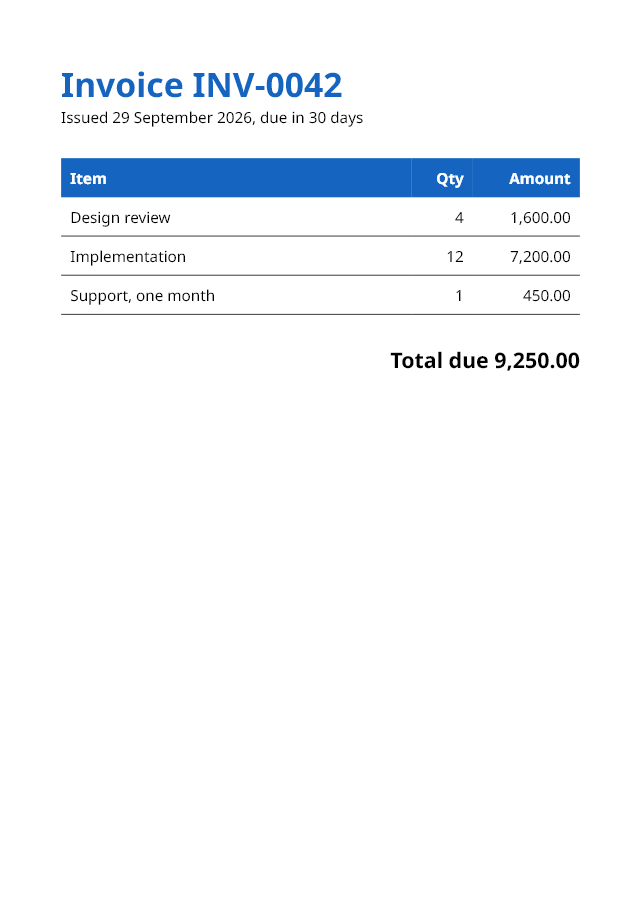 invoice.pdf · A5 · 1 page
Document document = Document.Compose(composition => composition.Section(section =>
{
    section.Trim = PaperSizes.A5;
    section.Margins = Sides.All(36);

    section.RunningHead().When(page => !page.IsFirst).FlushRight().Text("Annual report, continued");

    section.Body().Stack(stack =>
    {
        SampleData sample = new SampleData(seed: 5);

        stack.SpaceBetween(10);
        stack.Add().Text(text => text.Run("Annual report").PointSize(20));
        stack.Add().KeepTogether().Text(sample.Paragraphs(2));
        stack.Add().Text(sample.Paragraphs(6));
        stack.Add().NewPage();
        stack.Add().RequireSpace(150).Text(text => text.Run("Appendix").PointSize(16));
        stack.Add().Text(sample.Paragraphs(2));
    });
}));
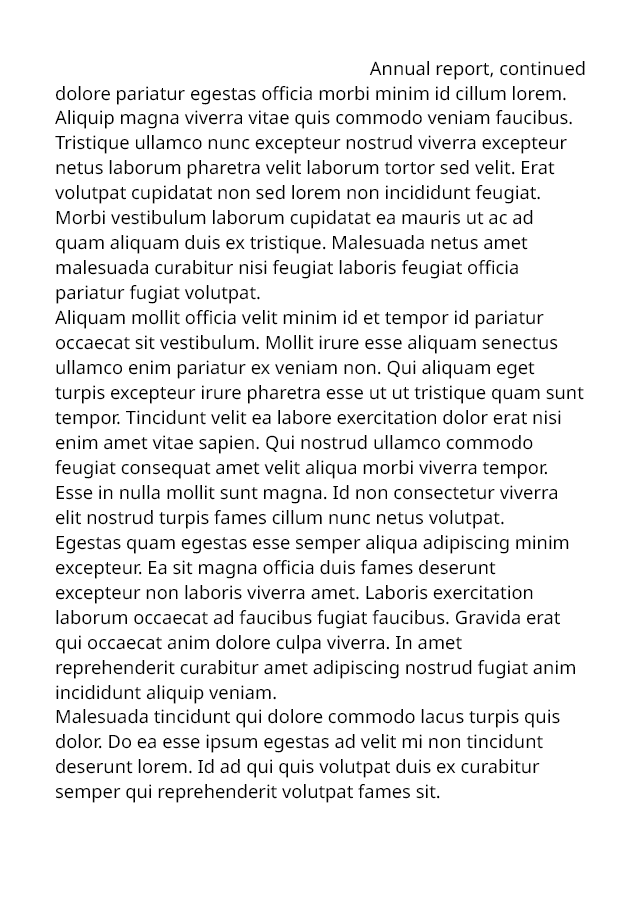 report · page 2
Every example on this site is compiled and run by the test suite, and every page shown is the one it sets.
Free, for everyone
MIT-licensed, for commercial and closed-source software too, with no revenue limits,
licence keys or paid tiers.
Plain .NET
No native dependencies in the core. .NET 10, and .NET Standard 2.0 for .NET Framework
4.7.2 and later.
Standards, checked
PDF/A-2 and PDF/A-3, tagged PDF/UA-1 and AES-256, each validated by veraPDF and
qpdf on every change.
A live previewdotnet watch redraws the page in your browser as you save, with an inspector that
opens the code behind any frame.
Find the frame you are after
The preview's inspector lists every frame on a page, each inside the frame that drew it. Point at one to outline it on the page; in the preview, clicking it opens the line of code that made it. These are the invoice's own frames, as the inspector records them.
Packages
The core needs nothing else. Add a package when a document calls for it.
Rustaveli.Pdf
Layout, text, images and PDF export: everything most documents need.
Rustaveli.Pdf.Raster
Pages as PNG, JPEG or WebP; SVG pages and XPS; image recompression. Uses
SkiaSharp.
Rustaveli.Pdf.Shaping
Arabic, Hebrew points, and Indic and South-East Asian scripts. Uses
HarfBuzzSharp.
Rustaveli.Pdf.Operations
Existing PDF files: merging, stamping, attaching and protecting.
Rustaveli.Pdf.Preview
A live preview in the browser, redrawn on hot reload.
Using the library
- Guides — the library task by task, every example compiled and run by the tests: getting started, layout, text, images and artwork, output, existing files, preview and debugging
- Coming from QuestPDF — its names mapped to these
- Features — everything the library does, by area
- Glossary — every name the API uses, and where it comes from
- Known limitations
How it works
- How layout works — the fitting contract, pagination, counting passes and per-page state
- The text engine — shaping, fallback, line breaking, bidirectional text and justification
- Fonts — finding and matching typefaces, and embedding them as subsets
- The PDF writer — objects, streams, compression and parallel exports
- Images, colour, standards and encryption
- Existing files — reading, repairing, combining and protecting PDF files
- Page images and preview — Skia rendering and the live preview
- How it's tested — unit, property-based, integration, conformance and mutation tests, and fuzzing
- Performance — benchmarks and file sizes
- Architecture decision records — the choices behind the design, and why
The project
- About — why the library exists, and how it was built
- Rustaveli.Pdf and QuestPDF — the design inspiration, licensing and the clean-room rewrite, with the parity checklist
- Contributing and conventions
- Security policy
- Changelog